Kubernetes: Learning how pods are scheduled and spread across nodes
“The cost of failure is education.” ― Devin Carraway
Previously I posted about a fictitious incident I created to help me learn more about Kubernetes concepts. I enjoyed the exercise that much that I’ve decided to do another! This time I’ll follow on from the previous incident by looking into a similar issue with a different cause.
The scenario
Following a routine deployment for a payments API, the service had no healthy backends and requests were failing. The control plane appeared healthy, but the deployment had zero available replicas and all three pods were stuck in a Pending phase.
Initial investigation
I started by checking the pods in the affected payments-prod namespace:
kubectl get pods -n payments-prod

payments-api pods are Pending, with none of their containers ready.A Pending pod has been accepted by the cluster, but one or more of its containers have not been set up and made ready to run. This can include time spent waiting for the scheduler to find a suitable node. Unlike the previous incident, there was no running application to debug yet, so I needed to find out why the scheduler could not place the pods.
Following the scheduling events
I picked one of the pods and inspected it:
kubectl describe pod payments-api-799cbcd65d-dqjtz -n payments-prod

This helped narrow down the problem. The scheduler had considered all three nodes, but none met the pod’s scheduling requirements.
When I inspected the deployment, I found the following nodeSelector in its pod template:
nodeSelector:
  platform.test/node-pool: payments
A node selector is a hard scheduling constraint. A pod can only be scheduled onto a node containing every label specified by that selector.
When I checked the labels for the two worker nodes I found the following:
node-01was labelled as part of thegeneralpool, notpaymentsnode-02was missing the thenode-poollabel entirely
My first guess was that this mismatch left the scheduler with nowhere to place the pods.
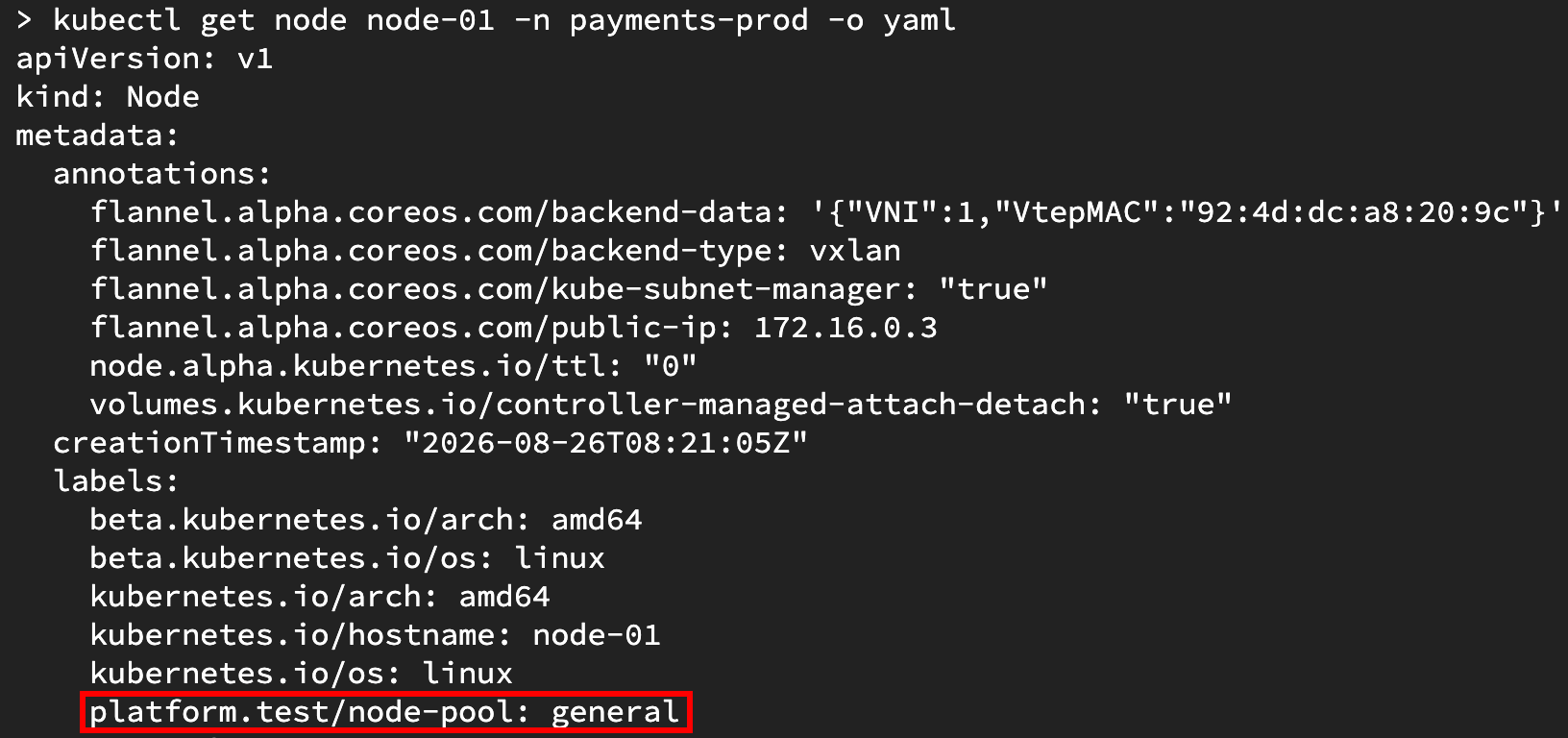
node-01 belongs to the general pool, which does not match the deployment's required payments value.Restoring the service
To test the hypothesis and restore capacity, I edited node-01 and changed its pool label from general to payments:
kubectl edit node node-01 -n payments-prod -o yaml
- platform.test/node-pool: general
+ platform.test/node-pool: payments
After chatting with my robot AI friend, I later found out that another way I could’ve made the same emergency change would have been:
kubectl label node node-01 platform.test/node-pool=payments --overwrite
Once the node matched the selector, the scheduler placed all three pods onto it and they became ready:
NAME                            READY   STATUS    RESTARTS   AGE   IP            NODE
payments-api-799cbcd65d-65nzt   1/1     Running   0          27m   10.244.2.3    node-01
payments-api-799cbcd65d-7wcrw   1/1     Running   0          27m   10.244.2.10   node-01
payments-api-799cbcd65d-sw6ts   1/1     Running   0          26m   10.244.1.9    node-01
I sent a request directly to one of the pod IPs and received a default NGINX response (the api didn’t return anything fancy since this was just a basic demo application).
This confirmed that the application was running again and the result supported my guess that the pods had been pending because their selector did not match any worker node labels.
A more permanent fix
Although the workload was running again, all three replicas were now on node-01. The service had recovered, but the deployment still had a single-node failure domain. If that worker node failed, every replica would disappear with it.
For this scenario, the intended configuration was for the application and both worker nodes to use the general pool. I changed the deployment’s selector from payments to general, waited for the rollout to complete, and then restored node-01 to the general pool.
 nodeSelector:
-  platform.test/node-pool: payments
+  platform.test/node-pool: general
In a real-world scenario, I would make these configuration changes via Infrastructure as Code (IaC)
but as my aim here was to learn and get more familiar with kubectl, I made these changes directly with commands. If I had a more sophisticated setup, the workload selector may live in a Helm chart,
while node labels may be configured through Terraform. For now, a live edit will restore the service, but it’s worth noting that if this was all tracked via IaC, leaving the source of truth unchanged would allow the mismatch to return on the next deployment.
Spreading the replicas
Making both worker nodes eligible to run the pods does not force Kubernetes to rebalance pods that are already running. To express the availability requirement in the workload configuration, I added a hostname topology spread constraint:
topologySpreadConstraints:
  - maxSkew: 1
    topologyKey: kubernetes.io/hostname
    whenUnsatisfiable: DoNotSchedule
    labelSelector:
      matchLabels:
        app.kubernetes.io/name: payments-api
The topologyKey tells the scheduler to treat each hostname as a separate domain. maxSkew: 1 allows the number of matching pods on those domains to differ by no more than one. With three replicas and two worker nodes, this should allow for a 2/1 or 1/2 split between the two worker nodes.
After the rollout, the replicas were spread across node-01 and node-02.

I also ran a small pre-deployment check which counted the ready nodes matching the selector and failed if there were fewer than two. This could be something useful to add to a CI check if this was for an important workload, otherwise it probably wouldn’t be worth the maintenance overhead.
Testing replacement scheduling
I wanted to see what would happen when a pod needed to be replaced while one worker node was unavailable for new scheduling. I read that I could cordon node-01, and select one of its payments pods, and delete it. After node-01 had been cordoned, I would need to delete the pod that was already running there as cordoning a worker node only prevents new pods from being scheduled onto it, it won’t remove existing pods running on it.
My first attempt returned NotFound:
Error from server (NotFound): pods "payments-api-9679cc6f5-9vfwj" not found
I’d given the correct pod name, but I had forgotten to include the payments-prod namespace in the delete command.
I retried with the namespace included:
POD=$(kubectl get pods \
  -n payments-prod \
  -l app.kubernetes.io/name=payments-api \
  --field-selector spec.nodeName=node-01 \
  -o jsonpath='{.items[0].metadata.name}')

kubectl delete pod "${POD}" -n payments-prod
This time it worked! Because node-01 was cordoned, the deployment’s replacement pod was scheduled onto node-02. After uncordoning (is that a word?) node-01, I deleted one of the pods on node-02 and its replacement was scheduled on node-01 and the deployment returned to a 2/1 spread.
What I learnt
This scenario felt like a useful continuation of the previous incident. In both cases the service could not serve requests, but the pod state led the investigation in a slightly different direction that gave me an opportunity to learn about a bunch of new concepts.
Here are some of the things I learnt:
- Pod events helped again to quickly explain why a
Pendingpod had not been scheduled. - Even if there are available worker nodes, a pod with a node selector won’t be scheduled for a node if there is a mismatched label.
- I improved my Kubernetes troubleshooting skills by restoring the service and picked up some new knowledge around how I can make a service more resilient using topology spread constraints.
I’m still really enjoying using scenario-based incidents as a way to improve my understanding of how Kubernetes works. I wish I had a more realistic production environment, with stuff like IaC and CI/CD setup to make the experience even better, but there are only so many hours in a day.
Who knows, maybe I can make a series around a more sophisticated setup in the future? Anyway, that’s all for this time!