Kubernetes: Understanding pod readiness and rollout strategies
“It is a capital mistake to theorise before one has data.” ― Arthur Conan Doyle
One of my favourite ways to learn tech is to simulate real-world scenarios, it builds an understanding through experience and unearths errors in my thinking that passive learning alone cannot surface. Today I want to share a scenario I created to learn more about how pods, services, readiness probes and rollouts work in Kubernetes.
The scenario
An application developer has just deployed a new release of an existing checkout API microservice running on a multi-node Kubernetes cluster. When they try to make a request to the service, the request fails with a connection error.
When checking each pod’s status, all three pods show they are running, but 0/1 containers are ready.

Running, but none of their containers are Ready.When checking the deployment, 0/3 replicas are ready and 0 are available.

Ready or Available.A running pod is not a ready pod
This exercise is great at highlighting the difference between a pod that is running and a pod that is ready to serve traffic.
The kubectl get pods command can show a pod’s status and how many of its containers are ready. A Running status means the pod has been bound to a node, all its containers have been created, and at least one is running or starting/restarting. It does not guarantee that the application is healthy or able to serve traffic. When a readiness probe is configured, the kubelet on the worker node uses its result to determine whether that container is ready to receive traffic. For example, an application may need to finish loading configuration before it can accept requests.
What went wrong?
I want to start by investigating the pod events, which should give me a list of recent events that occurred for a given pod.
If I pick one of the three pods, I can check the events using:
kubectl describe pod <pod-name> -n shop
Here I can see the list of pod events and my first clue as to what may have occurred.

The readiness probe that tells the kubelet on the worker node whether the container is ready to receive traffic is receiving a 404 status code from the configured endpoint. The next thing to do is to try to work out why.
The fact that the endpoint is returning a response at all tells me that the server is reachable in the container, but I want to verify the application’s behaviour directly. I can do this by connecting to one of the worker nodes and sending requests directly to a checkout pod inside the cluster. First I need to get the IP address of one of the pods:

Now I can connect to worker node-01 and make a request to the following application endpoints:
| Endpoint | Result |
|---|---|
| / | 200 OK |
| /ready | 404 Not Found |
| /healthz | 200 OK |
Okay, so this confirms that the application can serve requests directly, but the /ready endpoint doesn’t appear to exist.
Finally, I can check the deployment configuration, which confirms that the /ready endpoint has been set as the readiness probe path:
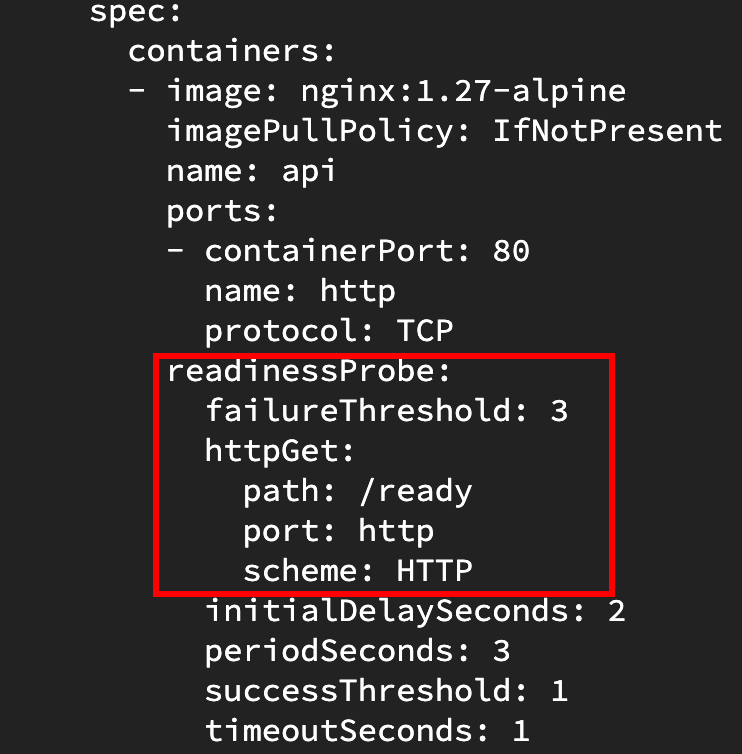
/ready.If this scenario was playing out for real, this is where I’d confirm with the application developer whether the endpoint was set by mistake and whether /healthz is the correct readiness endpoint.
Why the service had nowhere to send traffic
There is one service selecting the three pods that run the checkout API. Because none of the pods were ready, the service had no ready backends to serve traffic. This is a good opportunity for me to recap the relationship between services and pods.
A Kubernetes service is a way to reliably route traffic to a backend application that may be running on one or more pods. Kubernetes pods are replaceable, and a replacement pod receives its own IP address. The service provides clients with a stable IP address and DNS name when the set of backend pods changes.
But how does the service know which pods to route traffic to if their IPs can change? It uses a label selector. For a service with a selector, Kubernetes creates and updates endpoint slices for the matching pods. Readiness is recorded on those endpoints and, by default, endpoints that are not ready are not used to serve traffic.
For example, I can see the checkout-api service is configured correctly to select pods with the label app=checkout-api:

checkout-api service selects pods labelled app=checkout-api.
app=checkout-api label that matches the service selector.I can then take a look at the service’s endpoint slices which should show me that the matching pods are not ready:
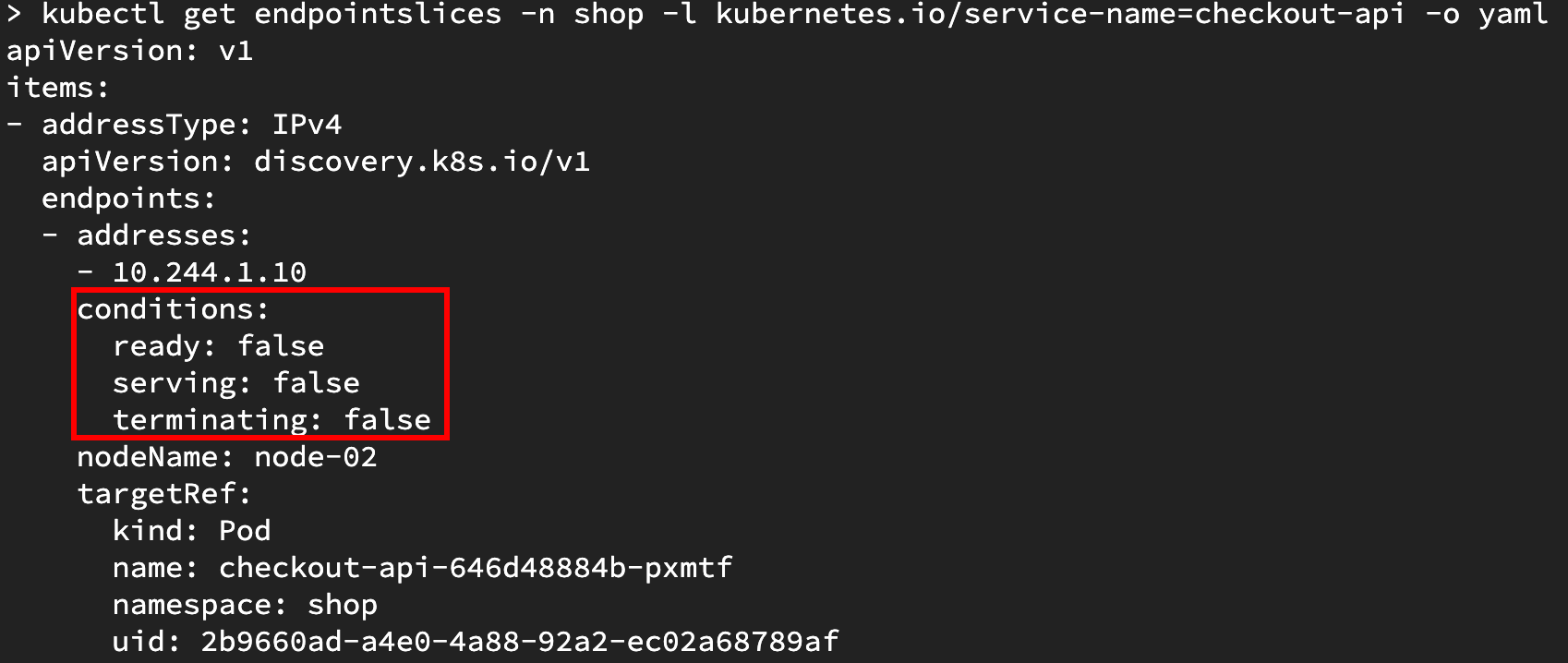
ready: false and serving: false.I can demonstrate that the service cannot serve traffic by making a request:
kubectl run curl-test \
  -n shop \
  --image=curlimages/curl \
  --restart=Never \
  --rm -i \
  -- curl -i --max-time 5 http://checkout-api
curl: (7) Failed to connect to checkout-api:80 after 0 ms: Could not connect to server
Because I’ve already established that none of the checkout-api pods were ready due to a misconfigured readiness probe endpoint, the endpoint slice has no endpoints marked ready to serve traffic. This explains why requests through the service fail even though direct requests on the worker node to the pod IP succeed.
Let’s update the readiness probe configuration to point at the /healthz endpoint:
kubectl edit deployment checkout-api -n shop
In the deployment’s pod template, I changed the readiness probe path:
 readinessProbe:
   httpGet:
-    path: /ready
+    path: /healthz
     port: http
Because the readiness probe is part of .spec.template, saving this change starts a new rollout and creates replacement pods. I can wait for that rollout to finish and then check the service’s endpoint slices again:
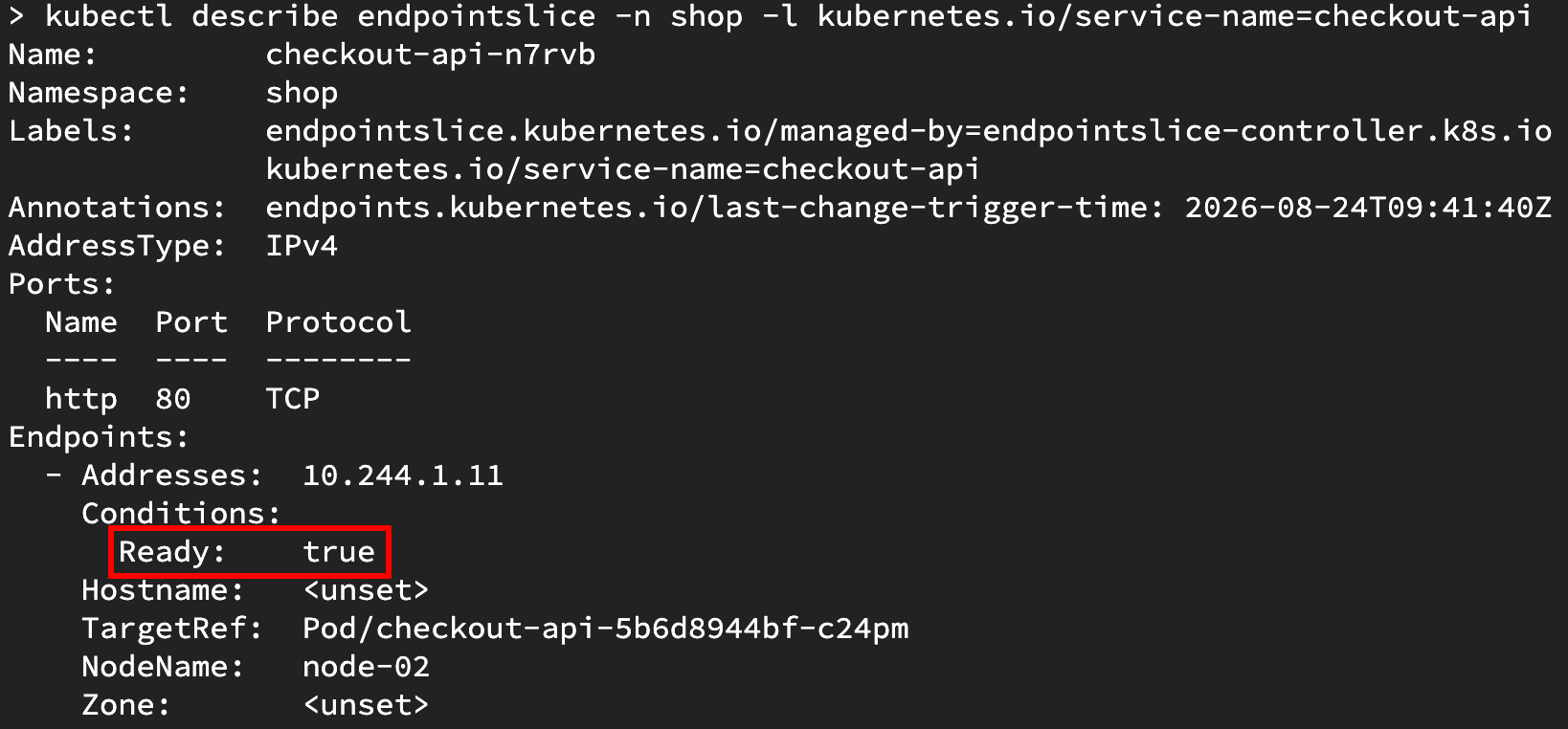
node-02 is marked ready: true and can receive service traffic.I can repeat the same request through the service to confirm that it is now able to serve traffic:
kubectl run curl-test \
  -n shop \
  --image=curlimages/curl \
  --restart=Never \
  --rm -i \
  -- curl -i --max-time 5 \
  -w '\nHTTP status: %{http_code}\n' \
  http://checkout-api
checkout-api v2.0.0
HTTP status: 200
Improving the rollout strategy
Now that the service is fixed, I could stop here. But given this blog is about learning platform engineering, let’s think about how the platform and developer experience could be improved for similar incidents in the future.
Why was a misconfigured readiness probe capable of bringing down an otherwise healthy service? Could the release process be improved to guard against a bad deployment causing an entire service outage? It turns out in this instance, it could.
The checkout-api deployment had three replicas configured, meaning three pods should normally be running. If I check the rollout strategy, I can see the following configuration:
kubectl get deployment checkout-api -n shop -o json | jq '.spec.strategy'
{
  "rollingUpdate": {
    "maxSurge": 0,
    "maxUnavailable": 3
  },
  "type": "RollingUpdate"
}
maxUnavailable: 3- the maximum number of desired pods that may be unavailable during the updatemaxSurge: 0- no extra pods may be created above the desired replica count during the update
The maxUnavailable value of 3 allows all three desired replicas to be unavailable during an update. This is why the checkout service could go from three healthy backends to none during this release. The deployment controller was allowed to scale all of the healthy old replicas down while the new pods failed the readiness check. The readiness probe correctly kept the broken new pods out of service traffic, but the current rollout policy had allowed the healthy capacity from the previous release to disappear. Let’s look at how this can be improved.
When I realised that the wrong endpoint was being used by the readiness probe, I could have rolled back to the last good release by using:
kubectl rollout undo deployment/checkout-api -n shop
This would’ve been the quickest path to recover the service, but it is a reactive step. I’m interested in whether there is a more proactive approach that would shield me from this problem in the future.
By making a small tweak to the rollout policy, I can stop this particular rollout failure from removing the existing healthy capacity when a bad deployment occurs in future:
kubectl patch deployment checkout-api \
  -n shop \
  --type=merge \
  -p='{
    "spec": {
      "strategy": {
        "type": "RollingUpdate",
        "rollingUpdate": {
          "maxUnavailable": 0,
          "maxSurge": 1
        }
      }
    }
  }'
maxUnavailable: 0- require the desired number of replicas to remain available during the rolling updatemaxSurge: 1- allow one extra pod above the desired replica count during the rolling update
What does this new configuration do? It ensures that if there are already three healthy pods serving traffic and a new release comes along, the deployment can create one new pod alongside the three healthy pods, as allowed by the maxSurge: 1 configuration. If that new pod is running but never becomes ready, then the controller cannot remove an available old pod without violating maxUnavailable: 0, and it cannot create another new pod because the surge limit has been reached. This will stall the rollout. This means that manual intervention will be needed to fix the deployment, but it allows the service to remain available to users while the failed rollout is investigated.
To test this, I can deliberately change the readiness probe back to the broken /ready path:
kubectl patch deployment checkout-api \
  -n shop \
  --type=json \
  -p='[
    {
      "op": "replace",
      "path": "/spec/template/spec/containers/0/readinessProbe/httpGet/path",
      "value": "/ready"
    }
  ]'
I can then inspect the deployment, replica sets and pods created by the rollout:
kubectl get deployment checkout-api -n shop
kubectl get replicasets -n shop
kubectl get pods -n shop -l app=checkout-api

0/1 ready, while all three pods from the previous release remain ready and available.The deployment remains 3/3 ready with 1 up-to-date and 3 available. The three healthy pods from the previous release remain available, while the new pod is running but never becomes ready. Instead of causing another outage, the rollout stalls.
I can verify that the rollout does not complete, and the service still serves requests successfully using the following commands:
kubectl rollout status deployment/checkout-api -n shop --timeout=30s

kubectl run curl-test \
  -n shop \
  --image=curlimages/curl \
  --restart=Never \
  --rm -i \
  -- curl -i --max-time 5 \
  -w '\nHTTP status: %{http_code}\n' \
  http://checkout-api
Waiting for deployment "checkout-api" rollout to finish: 1 out of 3 new replicas have been updated...

checkout-api v2.0.0
HTTP status: 200
What I learnt
I feel like I got a lot from this scenario-based exercise. It’s fun being able to debug issues and take the time to read documentation without the time pressure that comes with fixing a real production outage.
Here are a few of the things I learnt or revisited as part of this exercise:
- A
Runningpod is not necessarily aReadypod. - A misconfigured readiness probe can remove otherwise working pods from service traffic.
- A deployment’s rollout strategy can be used to improve service availability during an update.
As I reflect on this exercise, I can’t help but feel that my ability to debug felt rusty, presumably because AI helps a lot with debugging in my day job nowadays, abstracting away some of the lower-level complexity I used to encounter. However, searching for evidence, forming a hypothesis, and testing it in a methodical manner still seems like a valuable skill to have. There’s something satisfying about following the breadcrumb trail and piecing the clues together!
I hope to do more scenario-based exercises in the future. That’s all for this time.
References
- Pod lifecycle and the meaning of the
Runningphase - Configure Liveness, Readiness and Startup Probes
- Services, selectors, and stable access to changing backend pods
- Endpoint slice readiness conditions
- Deployment rolling updates,
maxUnavailable, andmaxSurge kubectl describeand its display of related events